Encrypted File Transfer Software

FileCloud Enables Secure File Sharing and Collaboration

Free Trial >>>
Client Logo
Client Logo
Client Logo
Client Logo
Client Logo
Client Logo

Secure Data Transfer Software

Simplified Security Solution

FileCloud enables enterprise-grade, secure file sharing with the tools and settings needed for data control and compliance. With easy-to-use features, FileCloud is a simple solution for organizations, customers, team members, and business partners.

Encryption for Data at Rest and in Transit

Encryption is a critical component for any secure data transfer software. FileCloud offers AES encryption for data at rest (128- or 256-bit), ensuring that data is secure while stored. Furthermore, FileCloud enables secure file transfer with TLS/SSL, preventing malicious cyberactivity such as eavesdropping.

Streamlined Collaboration

Forget messy email attachments and large files on pen drives. Access documents anytime, anywhere, from any device. Easily upload, edit, and share files over a secure collaboration network.

Gartner Per Insights Logo 2018
Gartner Per Insights Logo 2019
Gartner Per Insights Logo 2020
Gartner Per Insights Logo 2021
Gartner Per Insights Logo 2022

FileCloud has received the Gartner Peer Insights Customers’ Choice Distinction for the fifth consecutive time!

92% of our customers would recommend us to a friend.

Rating Stars Image 4.6

Encrypted File Transfer Software for Enterprise Collaboration

Data is the most important tool in today’s economy. Exchange of data or information with customers, employees, and partners is a core daily business activity. Shadow IT solutions like unsecured email, public cloud deployments, or FTP server based processes can leave businesses vulnerable to data loss or theft and even fines for non-compliance with data protection regulations.

Encrypted file transfer software ensures the security of files in motion through encryption, preventing unauthorized access and mitigating cyber threats. It enhances compliance, automates transfers, and offers authentication, audit logs, and integrity checks. These security mechanisms enable IT teams to manage business-critical information and enforce regulatory compliance while empowering users with the tools they need to fulfill collaboration and coordination responsibilities.

Encrypted file transfer software converts files into secure, unreadable formats during transmission, ensuring that only authorized users with the correct decryption keys can access the information. This software helps protect sensitive data from hackers and unauthorized access when shared over networks.

This software is essential for maintaining confidentiality and integrity throughout file exchanges, particularly for organizations operating in highly regulated industries or sharing data across geopolitical borders. FileCloud’s secure file transfer solution ensures seamless and encrypted file sharing, protecting sensitive data in motion. With advanced security features, it offers complete control, safeguarding critical information.

FileCloud is the Enterprise-grade Encrypted File Transfer Solution that Does More

FileCloud goes beyond encrypted file transfer software to offer a comprehensive enterprise solution for file transfers, with multi-layered security architecture, powerful administrative tools for data control, and a seamless end-user interface for file sharing. With encryption for data at rest and in transit, FileCloud protects files from unauthorized access, safeguarding enterprise information while enabling efficient collaboration.
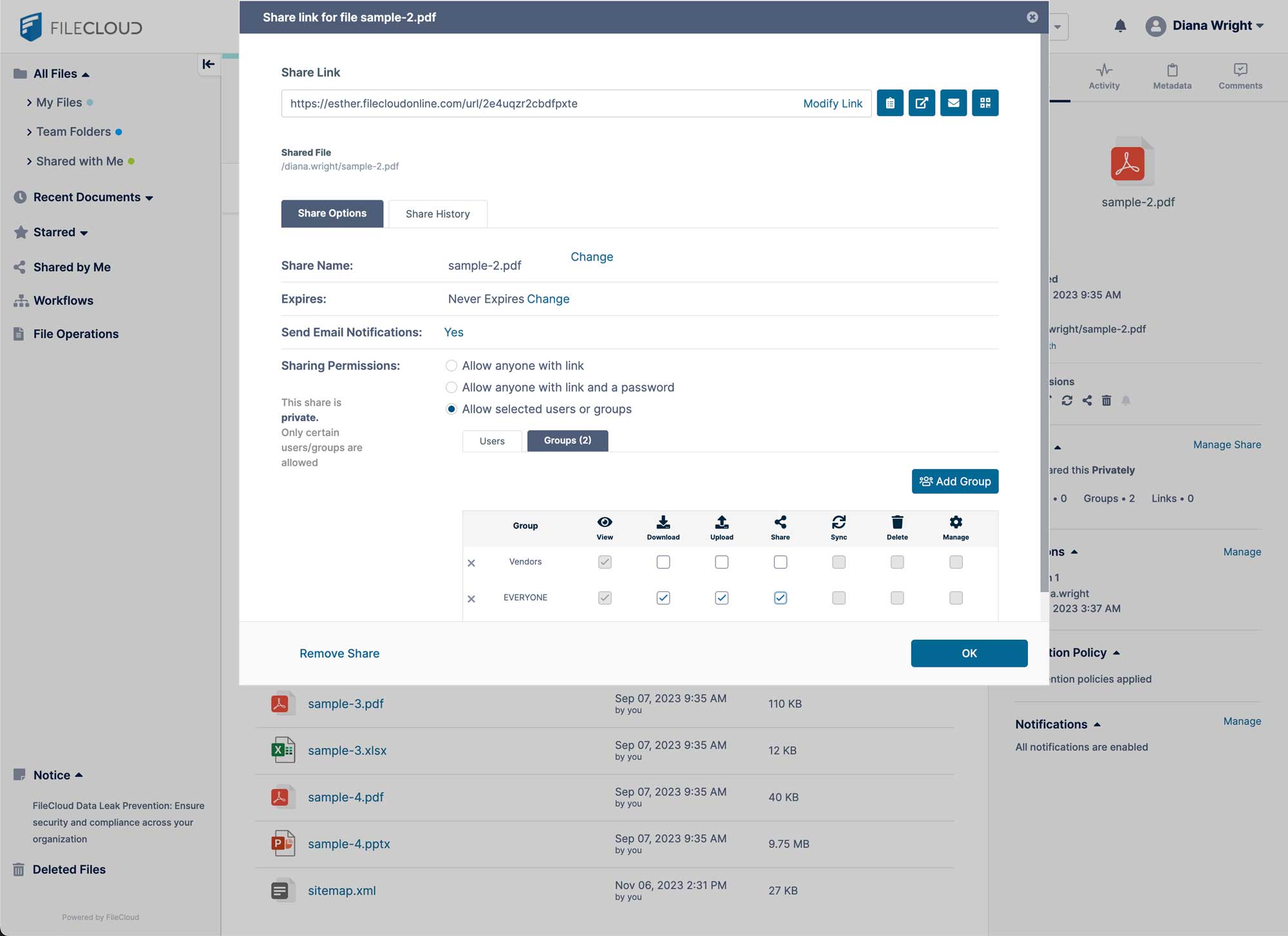
FileCloud secure file sharing UI

Large File Transfers

For organizations with a large volume of file transfers, FileCloud can be an even greater tool. Not only does FileCloud encryption secure data at rest and in motion, other FileCloud functions, such as large file sharing, resumable uploads, and unlimited external accounts, support streamlined, fast data relay without exposing files to unnecessary risk.

FileCloud Security Measures

  • Encryption: FileCloud can be configured with 256-bit AES encryption to secure data at rest, as well as TLS/SSL protocols to secure data in transit. For even greater security, FileCloud can be run in FIPS-mode to meet government/DoD security requirements. Encrypted file sharing ensures that data is protected from unauthorized access by encoding it during transfer and storage.
  • Two-Factor Authentication (2FA): FileCloud provides an extra layer of security during user login using security codes sent via existing channels. Admins can enable this option from the admin dashboard as a global, group, or user policy.
  • Malware Protection: FileCloud comes integrated with AV scanning to review any uploaded files for threats. It also offers an industry-first heuristic engine to detect ransomware and unlimited file versioning to prevent data loss and support business continuity.
  • Comprehensive Audit Logs: Admins can reference unchangeable audit logs for environment management, maintenance, and incident response. Audit logs capture activity within the platform, including the action taken by the users, files and folders impacted, IP address, mode of access (browser, client application, etc.) time and day, and geolocation.

Compliance Support for File Sharing

FileCloud includes powerful, built-in tools to support industry and global compliance regulatory requirements around file transfer. Admins can enable role-based access control (RBAC), Active Directory and Single Sign-on (SSO) integration, multi-factor authentication (MFA), and access policies to restrict how users access the platform and specific data stored within.

Admins can also use FileCloud Advanced to configure Data Governance tools such as Smart Content Classification, Data Leak Protection (DLP), and retention policies. With these settings enabled, admins can automate the identification of data as it enters the environment, tagging files with relevant metadata. Once tagged, this metadata can be set to trigger DLP rules or retention policies for automatic protection of sensitive or confidential data.
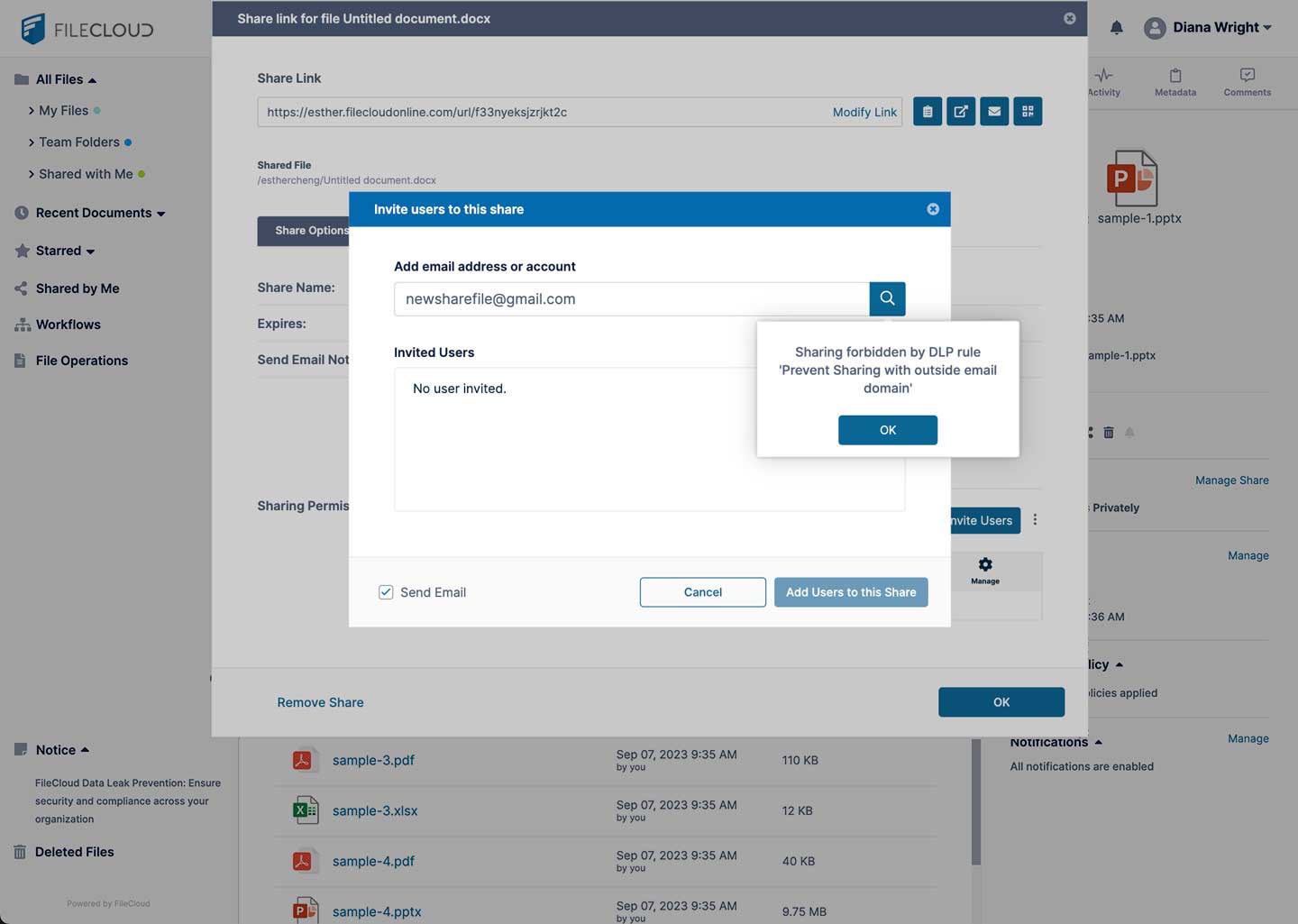
FileCloud UI - DLP rule triggered to automatically block file share

Secure Document Sharing Solution

FileCloud operates as a secure document sharing platform, providing enterprise-level security for your files while maintaining an easy-to-use interface that remains affordable for your business.

FileCloud’s secure file transfer software ensures safe data exchange with encryption, compliance controls and easy access, protecting sensitive information at all times.

A secure file transfer program enables the safe exchange of sensitive data between users, systems, or servers by using encryption and authentication protocols. It ensures data integrity and confidentiality through methods such as SFTP (Secure File Transfer Protocol), FTPS (File Transfer Protocol Secure) and HTTPS-based file sharing.

Learn more about secure file transfer service for safe and efficient data sharing.

“We love FileCloud’s simplicity, mobile apps, and above all, responsiveness of FileCloud team”

HIPAA Compliant File Sharing

FileCloud is a powerful file sharing platform for hospitals and healthcare organizations.

FileCloud supports HIPAA Compliance by providing encryption for data in transit and at rest, detailed audit logs, integration with existing network shares, powerful admin reporting tools, data leak prevention, remote device management, and Single Sign-on (SSO) capabilities.

FileCloud also supports large file sharing and document preview for DICOM medical images (e.g. X-rays, scans) directly in the browser.

Learn more about FileCloud for Healthcare Organizations.

Frequently Asked Questions (FAQs)

How can I securely share files online?

You can securely share files online in many different ways. Many people realize now that sharing files via email is not as secure as they need it to be. However, there are many different secure file transfer server software that focus on security, such as FileCloud.

How do I share encrypted files?

It is important for organizations to encrypt files when sharing across networks. Many file sharing solutions offer encryption to secure files in motion. The file is encrypted as part of the sharing process and decrypted when it reaches the intended recipient. Other file sharing options for security may include password-protection, expiring share links, and download limits.

What are the best secure file transfer solutions?

To determine the best file transfer solution based on security, look for encryption. File sharing solutions should enforce HTTPS through the use of an SSL or TLS certificate. These secure protocols verify that information is encrypted while in transit. Ideally, a secure file transfer solution would also include other security mechanisms like user authentication, access controls, and file permission settings and policies.

Is SCP transfer encrypted?

Encrypting files while they are being transferred is an important part of file-sharing. SCP, or— secure copy protocol—transfers files from a local to a remote server. It is seen as a more secure alternative to other options like FTP (file transfer protocol programs) as it enables an encrypted authenticated connection.

Is HTTPS secure for file transfer?

HTTPS is one mechanism for secure file transfer. The widely recognized HTTP, seen next to a URL, is unencrypted and not secure. HTTPS is the encrypted version, which means it can be used to safely transfer (most) files.

Worldwide

FileCloud
CodeLathe Technologies Inc.
dba FileCloud
125 Park Avenue FL 25
New York, NY 10017-5550

Fax: +1 (866) 824-9584

Europe

FileCloud Technologies Limited
Ducart Suite,
Castletroy Park Commercial Centre, Castletroy,
Limerick, Ireland


Copyright © FileCloud. All Rights Reserved.

Please select your country

SUBMIT